Posts

Showing posts with the label windows 7

Force low quality in Netflix

Image
Netflix offers an option in your account preferences to permanently set a lower bitrate:   https://account.netflix.com/HdToggle Unfortunately, this applies to all of your streaming devices.  If you'd like to throttle back the bandwidth for just once device, read  on... If you have an old computer you'd like to use to watch Netflix Streaming (Watch Now), but the graphics adapter and processor cannot keep up with the HD video, try this using Netflix Silverlight Stream Manager: Make sure the video is not maximized. Hit "ESC" if it is. Click the video once (to make sure it has focus) Simultaneously press:  " CTRL + ALT + SHIFT + S"  A pop-up should appear. Click "Manual Selection" Pick a lower buffer bit rate (the lowest -- 235 -- is still fairly watchable for TV shows, etc) Click "Apply" Close out Stream Manager by clicking the X in the top corner. Seek to a new place in the move that hasn't yet been streamed to active the ...
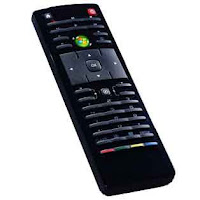
Dell Zino HD Remote Standard

Image
Took me hours and multiple calls to Dell Technical Support to find this information out. The Dell Zino HD uses the following IR standard for the Remote Sensor on the front: UPD6124A Here is the PDF specification:  http://www.datasheetcatalog.org/datasheet/nec/UPD6600A.pdf The support representative said most universal remotes use one of these two standards: RC5, RECS80 Unfortunately, this causes issues when trying to use a universal remote (example: XBOX 360 Universal Remote) with the Dell Zino HD.  A USB External IR sensor is needed to work with most universal remotes.  This is very confusing, as both devices list as a standard "Microsoft eHome Infrared Tranciever". What this means is that no remote -- other than the one that shipped with your device -- will work with your Dell Zino HD!  Scroll down to see my work-around. Since the Dell Zino HD only comes with 4 usb ports, the external sensor may have to be plugged in to the front of the devi...

AS/400 Hi-Res Icons

Image
Do you use Windows 7 or Windows Vista and still use an IBM Client Access for iSeries 5250 emulator to connect? If so, you may find the default icon (32x32) a bit small. Here's a modified icon to spruce up your Windows 7 desktop. Right Click --> Save As the image below. Name it "as400-hires.ico" Linux/Mac OSX Versions: -Tres