Posts

Showing posts with the label wmce

WMC + Netflix = *$&!

More Netflix + WMC woes... http://experts.windows.com/frms/windows_entertainment_and_connected_home/f/114/t/94027.aspx http://www.sevenforums.com/media-center/198778-wmc-freezes-end-netflix-episodes-2.html http://experts.windows.com/frms/windows_entertainment_and_connected_home/f/25/t/102327.aspx?PageIndex=2 http://experts.windows.com/frms/windows_entertainment_and_connected_home/f/25/t/102176.aspx http://www.thegreenbutton.tv/forums/viewtopic.php?f=5&t=730&start=40 http://experts.windows.com/frms/windows_entertainment_and_connected_home/f/25/p/102176/545905.aspx#545905 Windows Media Center freezes using the Netflix Plugin at the end of episodes.  This is sporadic and hard to troubleshoot. I've read that Netflix uses the PlayReady features in WMC (Windows Media Center) and deleting the PlayReady cache file can fix many problems. I've also had some limited success fixing Netflix + WMC errors by clearing my Internet Explorer cache and temporary int...
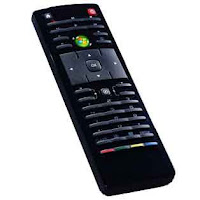
Dell Zino HD Remote Standard

Image
Took me hours and multiple calls to Dell Technical Support to find this information out. The Dell Zino HD uses the following IR standard for the Remote Sensor on the front: UPD6124A Here is the PDF specification:  http://www.datasheetcatalog.org/datasheet/nec/UPD6600A.pdf The support representative said most universal remotes use one of these two standards: RC5, RECS80 Unfortunately, this causes issues when trying to use a universal remote (example: XBOX 360 Universal Remote) with the Dell Zino HD.  A USB External IR sensor is needed to work with most universal remotes.  This is very confusing, as both devices list as a standard "Microsoft eHome Infrared Tranciever". What this means is that no remote -- other than the one that shipped with your device -- will work with your Dell Zino HD!  Scroll down to see my work-around. Since the Dell Zino HD only comes with 4 usb ports, the external sensor may have to be plugged in to the front of the devi...