Posts

SharePoint 2007 auto-rolls date at 23:30

Image
SharePoint 2007 has an annoying bug which automatically rounds "Today's Date" to tomorrow's date at 11:30PM or later.  This wasn't discovered until a Graveyard shift using SharePoint at that time. A column using "Date & Time" field set to "Today's Date" but set to only allow "Date", will "jump" to the next day at 11:30PM, which can be a nightmare to fix. I looked for a while on the internet to no avail. The solution is to use a calculated value of "[Today]" rather than the built in "Today's Date".  Since "[Today]" has no concept of hours and minutes, it never rounds at 11:30PM. -Tres

VBScript Bit-wise Operators

Working with Active Directory  userAccountControl   and VBScript (.vbs files) to check for a disabled account. This is a much better alternative to checking if the account is equal to "514"or "546".  Read on to understand why! (Full VBScript included at the very bottom)  ADS_UF_ACCOUNTDISABLE = 2 UserAccountControl = 514 If (UserAccountControl AND ADS_UF_ACCOUNTDISABLE) = ADS_UF_ACCOUNTDISABLE Then MsgBox UserAccountControl & " = Is Disabled!" Else MsgBox UserAccountControl & " = Is NOT Disabled!" End If The "AND" operator has two meanings in VBScript, depending on how it's used.  "AND" is normally used for  Boolean Logic , such as True AND False; however in VBScript, when used between two numbers, "AND"/"OR" is used as a " Bit-wise Logical Operator ", which is essential for comparing 1's and 0's underlying your decimal values.   The tricky part was knowing to use ...

VirtualBox Guest Additions Windows 8 Consumer Preview

Image
This worked for me.  Only thing it really provides is screen re-sizing, which if using the experimental Direct3D driver, seems to break Metro.  Do this at your own risk as both Areo Desktop Effects as well as VirtualBox Pointer Integration seem to work just fine out of the box! Take a snapshot of your VM!  This will give you a restore point if anything fails!!! You already have a working 64-bit version of Windows 8 Consumer Preview installed on a 64 bit Host, with Hardware Virtualization Enabled. In the Virtual Machine Settings, make sure the VM is configured with 2D and 3D support, 128MB Video RAM or higher (Machine needs to be powered off to make these changes) Some report that adding a second virtual processor is recommended for performance reasons. Power on Virtual Machine running Windows 8 Consumer Preview 64-bit. Type MSCONFIG from the "Start" home screen, when it lists, run it. If you are not at the home screen, hit CTRL + ESC at th...

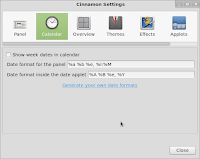
Linux Mint: Turn off military calendar

Image
To turn off military time in the system tray: Preferences, Cinnamon Settings, Calendar Change date format for the panel from: %a %b %e,  %H :%M To: %a %b %e,  %l :%M -Tres

Force low quality in Netflix

Image
Netflix offers an option in your account preferences to permanently set a lower bitrate:   https://account.netflix.com/HdToggle Unfortunately, this applies to all of your streaming devices.  If you'd like to throttle back the bandwidth for just once device, read  on... If you have an old computer you'd like to use to watch Netflix Streaming (Watch Now), but the graphics adapter and processor cannot keep up with the HD video, try this using Netflix Silverlight Stream Manager: Make sure the video is not maximized. Hit "ESC" if it is. Click the video once (to make sure it has focus) Simultaneously press:  " CTRL + ALT + SHIFT + S"  A pop-up should appear. Click "Manual Selection" Pick a lower buffer bit rate (the lowest -- 235 -- is still fairly watchable for TV shows, etc) Click "Apply" Close out Stream Manager by clicking the X in the top corner. Seek to a new place in the move that hasn't yet been streamed to active the ...

WMC + Netflix = *$&!

More Netflix + WMC woes... http://experts.windows.com/frms/windows_entertainment_and_connected_home/f/114/t/94027.aspx http://www.sevenforums.com/media-center/198778-wmc-freezes-end-netflix-episodes-2.html http://experts.windows.com/frms/windows_entertainment_and_connected_home/f/25/t/102327.aspx?PageIndex=2 http://experts.windows.com/frms/windows_entertainment_and_connected_home/f/25/t/102176.aspx http://www.thegreenbutton.tv/forums/viewtopic.php?f=5&t=730&start=40 http://experts.windows.com/frms/windows_entertainment_and_connected_home/f/25/p/102176/545905.aspx#545905 Windows Media Center freezes using the Netflix Plugin at the end of episodes.  This is sporadic and hard to troubleshoot. I've read that Netflix uses the PlayReady features in WMC (Windows Media Center) and deleting the PlayReady cache file can fix many problems. I've also had some limited success fixing Netflix + WMC errors by clearing my Internet Explorer cache and temporary int...

Netflix + WMC = Connection Error!?

Image
Is it a coincidence that Netflix Streaming stopped working in Windows Media Center after the Daylight Saving Time clocks were rolled back? (November 6th 2011). I called Netflix Support and they said it would need to escalate to Microsoft.  They were right.  Netflix played just fine in Chrome and IE, just not Windows Media Center.  Just in case, I  re-installed   everything  related to Netflix or Silverlight to no avail. Fortunately, I was able to fix it.  This is a really simple fix:   Clearing my Internet Explorer cache fixed this on my Win7 x64 machine.  I don't use IE for browsing, so I simply deleted all of my Internet Explorer Temporary Internet files.  Just doing the cookies would probably also do the trick. Now, Netflix works again!!  I gave Netflix good feedback because it really truly wasn't a problem with their service.  Hope this helps others! -Tres