Posts

NetBeans 6 Splash Screen
Image
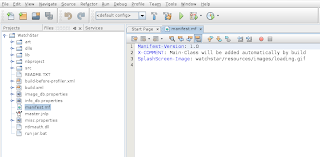
Update: 11/11/2010 This tutorial should still work on Netbeans 6.9.1+ The original thread link is broken thanks to Oracle taking over Sun's message boards, so this link is the best reference for now. Open NetBeans File, New, Java Desktop Application In the "Projects" area, click "Files" Locate the file in your main project called "manifest.mf" Double click it.  It should open automatically in the source editor window Add a new line to the bottom of the file: SplashScreen-Image: /package1/package2/filename.gif This image file can be located inside your JAR Perform a clean build of your project and run the JAR by itself.  The splash screen should now show while your application is launching. This new splash image can be JPEG, GIF, PNG, BMP and supports transparency for PNG an GIF OLD POST BELOW This is not for branding NetBeans, but rather for adding a standard splash screen to your application. What do I mean? NetBeans...

Amarok 1.4.7 Won't Load

Image
Amarok: [Loader] Starting amarokapp.. Amarok: [Loader] Don't run gdb, valgrind, etc. against this binary! Use amarokapp. You're seeing the standard Amarok start-up. But chances are you didn't stumble upon this because Amarok IS working... Luckily enough for me, I got it to load. Here's some hints: Kill amarok process: pkill -9 amarok In your home directory remove a file called ".DCOPserver_ $HOSTNAME __0" rm $HOME /.DCOPserver_ $HOSTNAME __0 In /var/tmp remove a file called kdecache- $USERNAME cd /var/tmp rm -r kdecache- $USERNAME Amarok should work! If needed, remove folder (or rename) $HOME/.kde/share/apps/amarok If needed, remove (purge) and reisntall amarok application with your package manager.

Centos 5.1 Segfault FTP

While performing a scripted FTP to an embedded device, I received a stack-trace Segmentation Fault. This was on Centos 5.1. Cause: I changed the date and it started breaking some authentication portion of FTP. Fix: For me, I rebooted the server making the connection. This was after hours of troubleshooting. Hopefully this helps others. -Tres

half-life 1 struggles (part 3)

Confirmed bug: http://bugs.winehq.org/show_bug.cgi?id=11324

half-life 1 struggles (part 2)

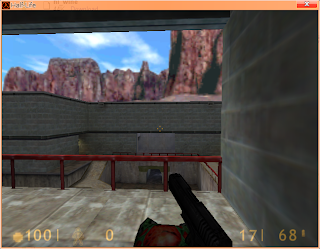
Note, I'm getting closer... I've found some consistencies... it almost appears that the "space character" is crashing OpenGL. By destroying the language file, the spaces are not loaded on the main menu. I'll have to do some more testing to prove this though. It appears this only occurs for certain fonts though, as speaking 'hello world' does not crash the game, but typing it in console does. Please see this video.

half-life 1 struggles

Image
[SOLVED] http://www.nvnews.net/vbulletin/showpost.php?p=1551104&postcount=26 Copied from the wine mailing list. Nothing ground-breaking yet. Let me know if you solve this issue! ========================================================= Anyone having issues with the old 1.6 Half-Life engine? OpenGL mode stopped working for me friday, but its still working in other windows applications. Counterstrike 1.6, Half-Life 1, etc won't work. My brother has same Linux distro and it didn't break for him, so I'm going out on a whim. I've reinstalled vid card drivers, wine, deleted drive_c, made a new user account in linux, etc. Everything asside from reformat the machine, which runs OpenGL great in every other program! -Tres DARKGuy . It wouldn't be a bad idea if you post some of the errors you're getting, your WINE version, linux distro and computer specs, you know, the standard stuff. It's really hard to help when all the info you have is just a "it doesn'...

Steam + HomeStarRunner

Image
Sewiously guys. :) Just for fun. ;) To accomplish this, simply drag an internet shortcut to your steam window. :) -Tres